Web Design and Development NIOS Vocation Exam Paper 2024
Download Web Design and Development NIOS Vocation Exam Paper Oct-Nov 2024. NIOS Vocational Solved Exam Paper. Download NIOS Exam Papers. Get Web Design and Development NIOS Vocation Exam Paper 2024 free.
Web Design & Development (622)
Set A
Time: 3 Hours Maximum Marks: 80
General Instructions:
- Candidate must write his/her Roll Number on the first page of the Question Paper.
- Please check the Question Paper to verify that the total pages and total number of questions contained in the Question Paper are the same as those printed on the top of the first page. Also check to see that the questions are in sequential order.
- For the Objective type questions, you have to choose any one of the four alternatives given in the question, i.e. (A), (B), (C) and (D) and indicate your correct answer in the Answer-Book given to you.
- Making any identification mark in the Answer-Book or writing Roll Number anywhere other than the specified places will lead to disqualification of the candidate.
- Answer for all questions, including Matching, True or False, Fill in the blanks, etc., are to be given in the Answer-Book only.
- Write your Question Paper Code No. 68/ACV/O-A on the Answer-Book.
Note:
a. Section-A contains 15 questions of 1 mark each.
b. Section-B contains 8 question of 2 marks each.
c. Section-C contains 8 questions of 3 marks each.
d. Section-D contains 5 questions of 5 marks each.
e. Answers of all questions are to be given in the Answer-Book given to you.
f. 15 minutes time has been allotted to read this question paper. The question paper will be distributed at 2:15 p.m. From 2:15 p.m. to 2:30 p.m., the students will read the question paper only and will not write any answer on the Answer-Book during this period.
SECTION-A
(1x15=15)
Fill in the blanks:
- __________ connection offers Internet connectivity through the use of digital phone lines instead of standard analog line and gives speed of upto 128 kbps or more.
- A __________ is a unique address on web and indicates where the webpage is stored on the Internet.
- __________ are obstacles that makes it difficult or some times impossible for the people with disabilities to do the things which a normal person does with ease.
- An accessible website does not rely on the mouse; it provides all functionality via __________ so that people with disabilities can use assistive technologies easily.
- Adobe Dreamweaver is an __________ editor for designing, coding, developing and managing websites and webpages for various applications.
- __________ are very important in a webpage as they can be used for importing and exporting tabular data.
- __________ are an important component of webpage and are images with text on them which guides the user to navigate from one location to another.
- __________ is normally a short program rather than a sequence of instructions which are interpreted.
- To publish your pages on web, you must send your files to the web host server which can be done using a __________ program.
- Tags which have both opening and closing (i.e. and) are called __________ elements in an HTML documents.
- __________ websites are large websites which usually include hundreds of webpages with large amount of content stored in an organized way.
- __________ define the objects that change in your animation.
- __________ in flash tool is associated with layers and frames and it organises and controls the objects in a flash document with respect to time.
- In Photoshop you can use __________ to arrange your work into different levels that can be viewed and edited as individual units.
- __________ means making table inside another table.
SECTION - B
(2x8=16)
Answer the following:
16. Define Internet and list out its applications.
17. Explain Bridges as Internetworking devices.
18. What are the Benefits and Drawbacks of DSL connection?
19. Explain five basic steps to be followed for organizing your content of website.
20. What do you understand by "Windows Object" and what are its methods ?
21. What are the Hardware Requirements for Multimedia ?
22. Write down the steps to insert text into frame.
23. Define Cropping and write down the steps of using cropping tool.
SECTION-C
(3x8=24)
Answer the following:
24. Explain the three image formats used in webpages.
25. Explain the Tutorial structure used for websites.
26. What is Hyperlinking Policy?
27. What is the use of visibility property of CSS?
28. Define the term "Properties Inspector".
29. Write a short note on "Event Handling".
30. What is iterative constructs? What are its types? Write their syntax.
31. Describe components of web accessibility.
SECTION - D
(5x5=25)
Answer the following:
32. Answer all the questions on the basis of the image given below : (Note: The document contains a diagram of computers connected to a central "HUB")
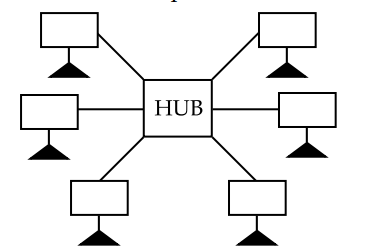
(a). Identify the type of topology and give a brief description.
(b). Write the advantages of this topology.
(c). Write the disadvantages of this topology.
(d). The central point of this topology is a HUB; What is its significance ?
(e). Write one of its advantage and disadvantage.
33. Give a brief description of the following:
(a). Ordered and Unordered list
(b). Character formatting tags.
(c). Cascading Style Sheets (CSS)
(d). Special characters used for creating HTML documents.
(e). Essential HTML elements.
34. Write the HTML code to create the following table : Apply yellow background colour to the complete column heading NAME and red colour to the last row. Also display the word CHRISTMAS in ITALICS.
| SI. NO. PDF | NAME PDF | DAY PDF | DATE PDF |
|---|---|---|---|
| 1. | INDEPENDENCE DAY | WEDNESDAY | 15.08.2024 |
| 2. | MAHATMA GANDHI'S BDAY | WEDNESDAY | 02.10.2024 |
| 3. | CHRISTMAS | [Blank/Implicit] | 25.12.2024 |
(Table Header: LIST OF HOLIDAYS)
35. Write the steps to create a webpage using Dreamweaver. Also write what is the quickest way of creating a new document.
36. Briefly describe each one of the following:
(a). Word press
(b). Multimedia development tools
(c). Multimedia formats
(d). A list of webpage components
(e). Desirable features of a multimedia system
Other Important links:

0 Comments
Be the first to comment.
Leave a comment
Your email will not be published. Comments are reviewed before appearing.